Developer Documentations
Introduction
Before using VaultsPay in your web application, you need to complete the following tasks;
Acquiring API Privileges
Reach VaultsPay customer service to get instant help. Our developers are evermore willing to help you integrate VaultsPay into your application.
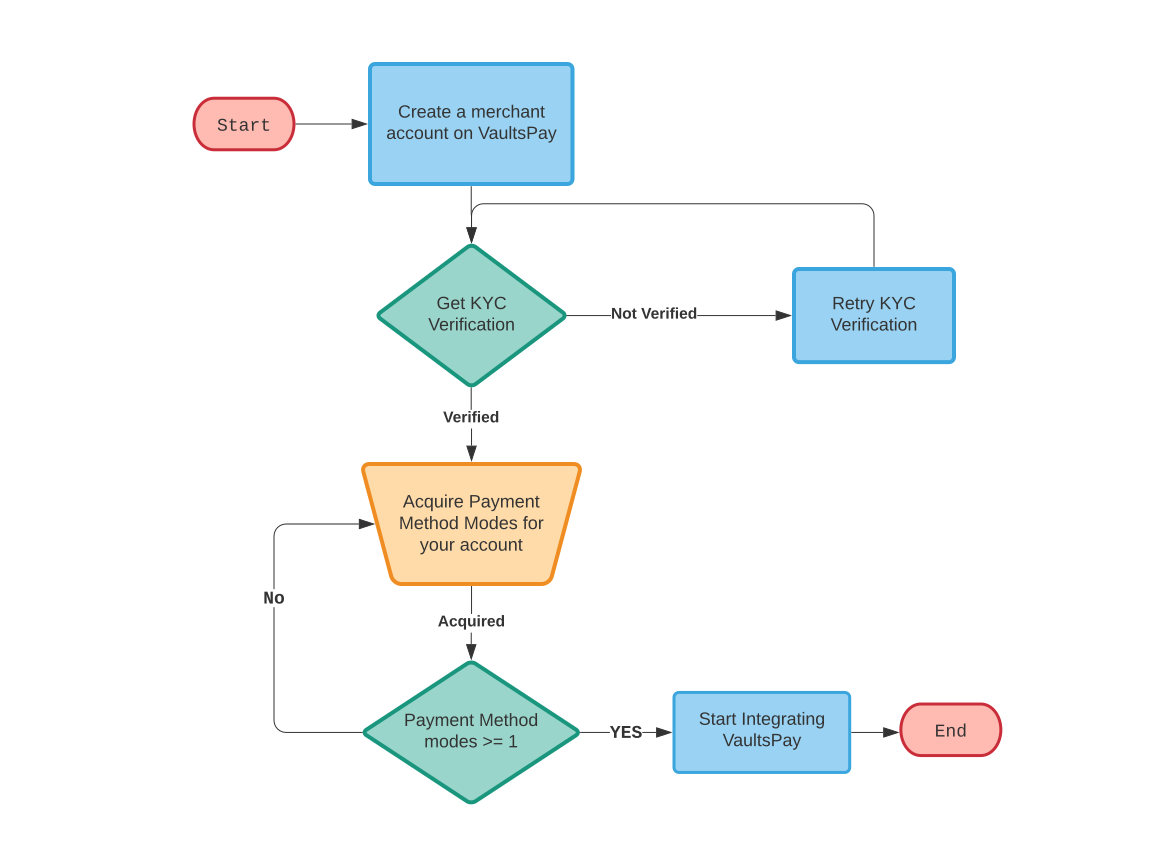
KYC Verification
VaultsPay value our customers and their privacy is our great concern. Therefore, VaultsPay requires all merchants to verify their business details by providing proper evidence. Once you get VaultsPay KYC (Know Your Customer) approval, only then, you can start using VaultsPay services.
In case of counterfeit documents and fallacious information, a merchant shall liable to legal proceedings.
Payment Modes
VaultsPay believes in flexibility; therefore, it provides different payment modes to its customers. These payment modes vary according to a business agreement and other parameters. These payment modes also enable a merchant to use different payment methods simultaneously.
Merchants who enable Google PayTM through VaultsPay must comply with the applicable Google Pay API requirements, terms, policies, and brand guidelines.
Before integrating Google PayTM, merchants must:
- Comply with the Google Pay API Acceptable Use Policy
Merchants must ensure that their use of Google PayTM complies with the Google Pay & Wallet APIs Acceptable Use Policy.
- Accept the Google Pay API Terms of Service
Merchants must review, accept, and comply with the Google Pay API Terms of Service before using Google PayTM.
- Follow Google Pay Brand Guidelines
Merchants must use Google PayTM logos, payment buttons, and other Google Pay brand elements in accordance with Google's Brand Guidelines. Google Pay branding must not be modified or presented in a way that misrepresents its association with the merchant or VaultsPay.
- Use an approved integration
Merchants must integrate Google PayTM using the Google Pay API configuration and integration method supported by VaultsPay.
- Use the approved production domain
Merchants must provide and use the website/domain registered and approved for their Google PayTM integration, where applicable.
- Maintain compliance
Merchants are responsible for maintaining compliance with Google's applicable requirements, policies, and terms throughout their use of Google PayTM.
Important
VaultsPay provides the payment processing/acquiring services and integration capabilities required to support Google PayTM. However, each merchant is responsible for ensuring that its use of Google PayTM complies with Google's applicable requirements, including the Google Pay API Terms of Service, Acceptable Use Policy, and Brand Guidelines.
For the latest requirements and documentation, merchants should refer to the official Google Pay API Developer Documentation.
The above policies and guidelines may be updated by Google from time to time. Merchants are responsible for reviewing and complying with the latest applicable Google requirements.
Example of Payment Modes:
| # | Code | Name | Currency | Additional Feature |
|---|---|---|---|---|
| 1 | SCM_01 | Card Payment | AED | 3D Secure |
| 2 | SCM_02 | APPLE PAY | AED | 3D Secure |
| 3 | SCM_03 | GOOGLE PAY | AED | 3D Secure |